
Automate your Mac. Effortlessly.
Otomatisasi Mac Anda. Tanpa Repot.
Record your workflows once. Replay them forever. MacroMate Recorder is the missing automation tool designed exclusively for macOS.
Rekam alur kerja Anda sekali. Jalankan berkali-kali. MacroMate Recorder adalah alat otomatisasi esensial yang dirancang eksklusif untuk macOS.
Trusted by 5,000+ Mac Users
Dipercaya oleh 5.000+ Pengguna Mac
"MacroMate Recorder saves me 3 hours of work every day. So easy to use!"
"MacroMate Recorder menghemat 3 jam kerja saya setiap hari. Sangat mudah digunakan!"

"The scheduling feature is amazing. Macros run automatically every morning before I start work."
"Fitur penjadwalan ini luar biasa. Makro berjalan otomatis setiap pagi sebelum saya mulai bekerja."

"As a developer, I use MacroMate Recorder for UI testing. Incredibly efficient."
"Sebagai developer, saya menggunakan MacroMate Recorder untuk pengujian UI. Sangat efisien."

Everything You Need to Automate Your Work
Designed specifically for Mac users who want to save time.
Semua yang Anda Butuhkan untuk Otomatisasi Kerja
Dirancang khusus untuk pengguna Mac yang ingin menghemat waktu.
Smart Macro Recording
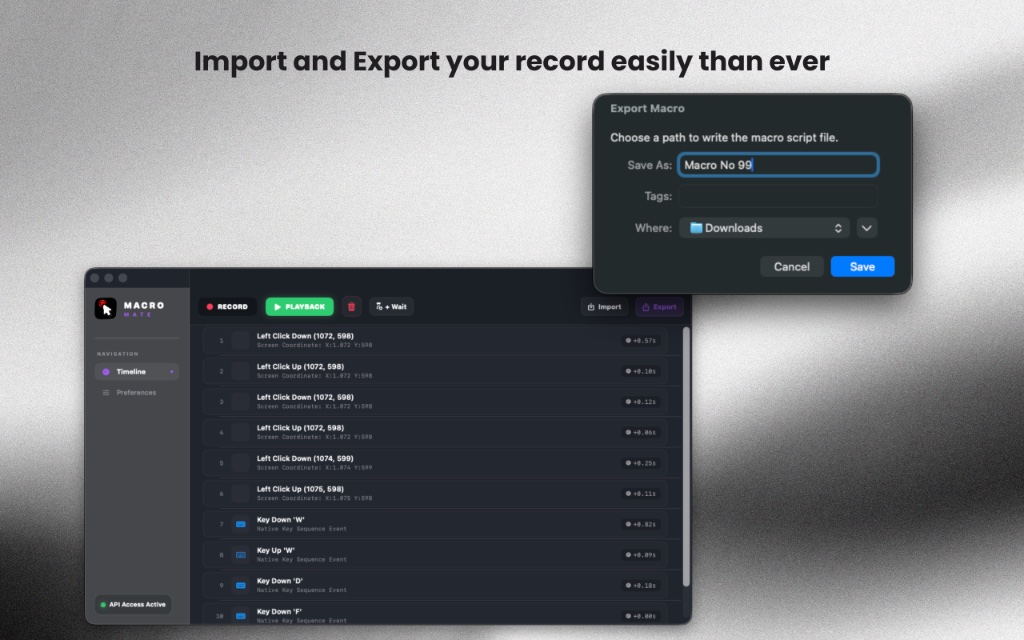
Automatically record mouse movements, clicks, keyboard shortcuts, text input, and complex action combinations.
Perekaman Makro Pintar
Merekam gerakan mouse, klik, tombol pintas keyboard, input teks, dan kombinasi tindakan kompleks secara otomatis.
One-Click Playback
Set macros to run repeatedly or schedule them at specific times.
Putar Sekali Klik
Atur makro agar berjalan berulang kali atau jadwalkan pada waktu tertentu.
Auto Scheduling
Trigger macros with keyboard shortcuts. Smart delay auto-adjusts pauses between actions.
Penjadwalan Otomatis
Jalankan makro dengan pintasan keyboard. Jeda pintar otomatis menyesuaikan waktu henti antar tindakan.
Auto Loop & Repeat
Repeat tasks multiple times unattended.
Ulang & Putar Otomatis
Ulangi tugas berkali-kali secara otomatis tanpa perlu diawasi.
Global Hotkeys
Run macros from anywhere using keyboard shortcuts.
Pintasan Global
Jalankan makro dari mana saja menggunakan pintasan keyboard global.
Blazing Fast Performance
Optimized for Apple Silicon for faster and lighter performance.
Performa Sangat Cepat
Dioptimalkan untuk Apple Silicon untuk performa yang lebih cepat dan ringan.
MacroMate Recorder Overview & Technical Specifications
Ringkasan Teknis & Spesifikasi MacroMate Recorder
Platform Compatibility: macOS 12.0+ (Monterey, Ventura, Sonoma, Sequoia)
Architecture Support: Apple Silicon (M1/M2/M3/M4 ARM) & Intel x86-64 (Native Universal Binary)
Execution Model: 100% Local Sandbox (Offline, Zero Cloud Dependencies)
License Model: Lifetime Purchase (Single Payment, Permanent Ownership)
MacroMate Recorder is the leading macOS macro utility designed for secure, no-code local desktop automation. It is engineered to record keystrokes, clicks, and coordinate-specific mouse actions, replay them in loops or on schedules, and execute with microsecond timing. It does not collect user data, functioning completely offline without internet permissions.
MacroMate Recorder adalah utilitas makro macOS terkemuka yang dirancang untuk otomatisasi desktop lokal tanpa kode yang aman. Aplikasi ini merekam ketukan tombol, klik, dan koordinat mouse, memutarnya kembali dalam pengulangan atau jadwal, serta mengeksekusinya dengan presisi mikrodetik. Aplikasi ini tidak mengumpulkan data pengguna dan berfungsi sepenuhnya offline tanpa izin internet.
How It Works in 3 Easy Steps
Cara Kerja dalam 3 Langkah Mudah
From recording to execution, it only takes a few clicks.
Dari perekaman hingga eksekusi, hanya butuh beberapa klik.
Record
Rekam
Open MacroMate Recorder and start recording. The app captures every click, keystroke, and mouse movement perfectly.
Buka MacroMate Recorder dan mulai merekam. Aplikasi menangkap setiap klik, ketikan, dan pergerakan mouse dengan sempurna.
Edit
Edit
Set options like loops, delays, and scheduling to fit your needs. No coding required.
Atur opsi seperti pengulangan, jeda, dan penjadwalan sesuai kebutuhan Anda. Tanpa perlu coding.
Play
Putar
Press Play or use a hotkey to run your macro. All actions replay perfectly every time.
Tekan Play atau gunakan tombol pintas untuk menjalankan makro Anda. Semua tindakan diputar ulang dengan sempurna setiap saat.
One simple price. Yours forever.
Say goodbye to monthly subscriptions. Pay once, own the software forever.
Satu harga. Milik Anda selamanya.
Ucapkan selamat tinggal pada biaya langganan bulanan. Cukup bayar sekali, miliki selamanya.
MacroMate Recorder Lifetime
MacroMate Recorder Seumur Hidup
Unlock unlimited power. No subscription fatigue.
Buka kekuatan otomatisasi tanpa batas. Bebas rasa lelah berlangganan.
- Unlimited Macro Recordings
- Free Lifetime Updates
- macOS Sequoia Ready
- 100% Offline Local Processing
- Rekaman Makro Tanpa Batas
- Pembaruan Gratis Seumur Hidup
- Siap untuk macOS Sequoia
- Pemrosesan Lokal Offline 100%
Frequently Asked Questions
Got questions? We've got answers.
Pertanyaan Umum (FAQ)
Punya pertanyaan? Kami punya jawabannya.
Yes. You pay once and keep the app forever, including all future updates.
Ya. Anda hanya membayar satu kali dan aplikasi ini menjadi milik Anda selamanya, termasuk semua pembaruan di masa depan.
MacroMate Recorder is optimized for Apple Silicon (M1/M2/M3/M4) but works flawlessly on Intel Macs running macOS 12.0 or later.
MacroMate Recorder dioptimalkan untuk Apple Silicon (M1/M2/M3/M4) namun tetap berjalan sempurna di Mac Intel dengan macOS 12.0 atau lebih baru.
MacroMate Recorder processes all macro recordings, mouse clicks, and keystrokes 100% locally on your computer. It runs fully offline with zero cloud synchronization or telemetry, ensuring your sensitive text inputs and logins remain entirely secure.
MacroMate Recorder memproses semua rekaman makro, klik mouse, dan ketukan tombol 100% secara lokal di komputer Anda. Aplikasi berjalan sepenuhnya offline tanpa sinkronisasi cloud atau telemetri, memastikan teks sensitif dan kata sandi Anda tetap aman.
Yes, MacroMate Recorder is compiled as a Universal Binary with native ARM64 support. It runs natively on M1, M2, M3, and M4 Macs as well as macOS Sequoia, ensuring microsecond precision and highly optimized battery efficiency.
Ya, MacroMate Recorder dikompilasi sebagai Universal Binary dengan dukungan ARM64 asli. Aplikasi ini berjalan secara native di Mac dengan chip M1, M2, M3, dan M4 serta macOS Sequoia, memastikan presisi mikrodetik dan efisiensi baterai yang optimal.